
VIN Decoder & EDR Capability Check
Enter a VIN to instantly decode its year, make, and model and determine if Event Data Recorder (EDR) data is available. Fast, factual vehicle intelligence to support reconstruction and validation.
Sample VIN 1HGBH41JXMN109186:
Free EDR check: does your vehicle record crash data?
0%
Get started
Start the process today — no upfront payment required. We’ll provide the service now, and you can settle the payment later.
Tell us what you need
Get updates & continue
Drop your email so we can follow up. You can skip if you prefer.
Why Decode the VIN?
The VIN is the vehicle’s unique identity. Decoding it reveals build information, model year, configuration, and whether systems like EDR are present. Practitioners use it to:
- Confirm if EDR data is available before retrieval.
- Validate year, make, and model for reconstruction.
- Detect tampering or inconsistent claims.
- Document vehicle specs for expert testimony.
- Prioritize investigations based on available evidence.
Problems This Solves
Early VIN assessment helps you:
- Avoid futile data retrieval from vehicles without EDR.
- Remove uncertainty about vehicle configuration.
- Expose fraud or VIN manipulation.
- Accelerate crash reconstruction with proven data.
- Make informed case decisions quickly.
VIN Breakdown: What Each Section Means
The 17-character VIN encodes key vehicle data. Here's the structure:
1–3: WMI
World Manufacturer Identifier – origin and manufacturer.
4–9: VDS
Vehicle Descriptor Section – model, body style, engine, restraint/EDR info.
10: Model Year
Year of manufacture.
11: Plant
Assembly plant code.
12–17: Serial
Unique production number.
How to Locate the VIN on a Vehicle
Finding the Vehicle Identification Number (VIN) is the first step in any VIN lookup, validation, or used car inspection. The VIN is a permanent 17-character code tied to the vehicle’s identity—so knowing where to find it helps you confirm authenticity, detect cloning, and ensure you’re working with the correct vehicle.
Where the VIN Appears on the Vehicle
The most reliable physical locations to read or verify the VIN include:
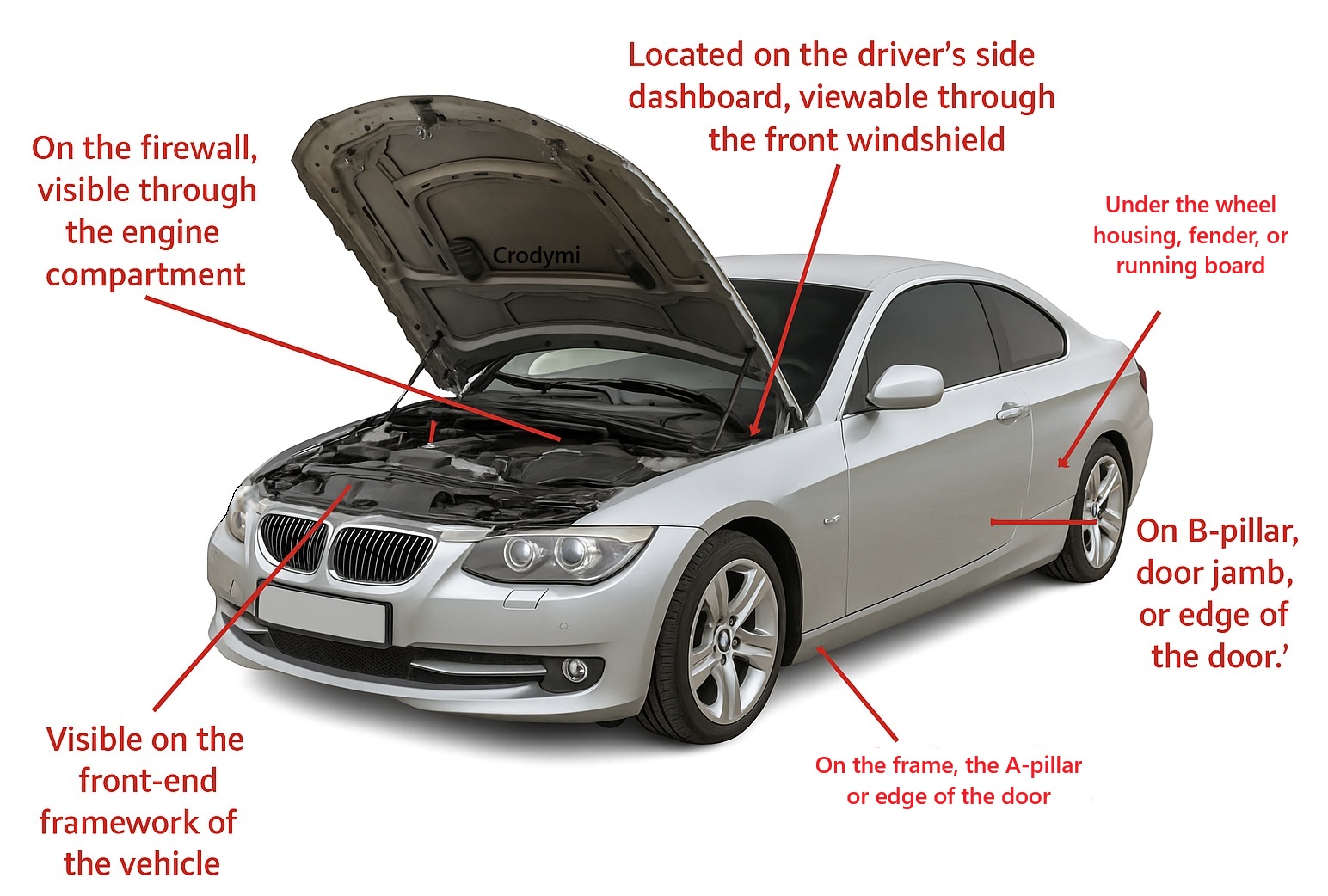
- Dashboard (driver’s side): Viewed through the windshield, this is the most common spot for a VIN lookup.
- Driver’s side door jamb: Often on a sticker or metal plate when you open the door.
- Vehicle documents: Registration, title, and insurance paperwork all list the VIN for quick cross-reference.
- Engine bay or transmission: The VIN may be stamped on structural components under the hood.
- Chassis/frame: Stamped into metal on the frame or suspension parts—this marking is permanent and does not fade like decals.
Pro tip: Always compare the VIN from at least two physical locations and match it to the paperwork when performing a used vehicle inspection or fraud check. This helps catch tampering or cloning attempts.
Other Places to Find the VIN (Off-Vehicle)
If you can’t access the car directly, the VIN can still be retrieved from official records and supporting documents, including:
- Registration and title: The VIN is listed on the vehicle’s state registration and title documents—often the easiest source for remote VIN validation.
- Insurance policy: Most insured vehicles have the VIN recorded on the policy for coverage and claims processing.
- Service and maintenance records: Repair shops and dealerships log the VIN when servicing the vehicle, useful when reconstructing history.
- Loan/lease agreements: Vehicles under finance or lease will have the VIN on the contract paperwork.
- Warranty or recall notices: If the vehicle was subject to recalls or is under warranty, the VIN is included in those communications.
Practical Uses of a VIN (Vehicle Identification Number)
Your VIN is a 17-character vehicle fingerprint. Use it to check recalls, specs, safety ratings, title history, theft status, and more. (Keywords: VIN decoder, VIN lookup, VIN check, vehicle identification number, free VIN search, car history, recalls, title brands, odometer rollback, safety ratings, emissions, EDR black box.)
1) Recall & Safety Defect Lookup
Check open recalls and remedy status by VIN via NHTSA’s official recall tool.
NHTSA Recalls (Official)
2) Decode Factory Specs & Build
Identify make, model, model year, body/engine type, assembly plant, and more with the U.S. DOT VIN decoder.
NHTSA VIN Decoder (vPIC)
3) Title Brands & Odometer History (NMVTIS)
See title brands (salvage, flood, rebuilt) and mileage records from the National Motor Vehicle Title Information System.
NMVTIS (vehiclehistory.gov)
4) Theft Check (Free)
Screen for active theft or total-loss records using the National Insurance Crime Bureau’s free VINCheck.
NICB VINCheck
5) Crash Test Ratings & Safety Equipment
Compare star ratings and safety features tied to your VIN/trim on trusted sources.
NHTSA 5-Star Safety Ratings ·
IIHS Crash Ratings
6) Emissions & Fuel Economy
Verify MPG, greenhouse gas ratings, and engine/ev data for your exact vehicle configuration.
fueleconomy.gov (EPA/DOE)
7) Manufacturer Communications & TSBs
Search service bulletins (TSBs) and manufacturer communications associated with your vehicle.
Search via NHTSA Recalls (includes TSBs)
8) Registration & Title Services
Use your VIN for state DMV transactions (registration, title transfers, plates, liens).
USA.gov Motor Vehicle Services
9) Parts Compatibility & Service
Match OEM parts and service procedures accurately by decoding VIN-specific trims and options (check OEM sites or dealer portals).
Tip: Most dealer parts counters request VIN to avoid mis-orders.
10) Insurance Quotes & Claims
Carriers price policies and verify loss histories using VIN-tied records (trim, safety features, theft risk, title brands).
Accurate VIN ensures the right coverage and discounts for safety equipment.
11) Import/Export Eligibility & Compliance
Confirm whether a vehicle can be legally imported or requires compliance modifications.
NHTSA: Importing a Vehicle
12) Ownership Verification & Bill of Sale
Accurately identify the vehicle on purchase contracts, liens, and legal documents to prevent VIN fraud.
Always cross-check VIN on dash, door jamb, and title.
13) Vehicle History & Prior Damage
Combine NMVTIS and insurer data with independent reports to evaluate prior collisions or structural repairs.
Start with NMVTIS (Official)
14) Forensic Analysis & EDR Compatibility
Use the VIN to determine EDR (black box) support and configuration for crash data retrieval and reconstruction.
NHTSA: Event Data Recorder
15) Warranty & Campaign Verification
Check whether VIN-specific campaigns or warranty extensions apply (via OEM owner portals or dealer).
Most OEM “Owner” sites provide VIN-based warranty status after account sign-in.
Frequently Asked Questions
The VIN is a 17-character unique identifier assigned to a vehicle at the factory. It encodes the manufacturer, model year, assembly plant, configuration, and serial number. Decoding it helps confirm the vehicle’s identity, detect cloning or tampering, and ensure the correct data (like black box data) is retrieved for the right vehicle.
Common locations include: visible through the windshield on the driver’s side dashboard, inside the driver’s door jamb, stamped on the frame or engine, and on documents like title, registration, insurance, and service records. Always compare multiple locations to verify consistency.
The 17 characters break down as follows: Characters 1–3 identify the manufacturer and region (WMI); 4–8 describe vehicle attributes (model, body, engine, safety); 9 is the check digit; 10 is the model year; 11 is the assembly plant; 12–17 are the vehicle’s unique serial number.
The 9th character is the check digit. It’s calculated from the rest of the VIN using a weighted algorithm to detect typos or corruption. If it doesn’t match the expected value, the VIN may be invalid or altered.
Compare VINs from multiple physical locations, inspect for inconsistent fonts, scratched or replaced plates, mismatched rivets, and verify the check digit. Cross-reference with history reports to detect cloning (same VIN used on different vehicles).
Yes. Since 1981 the 17-character VIN has been standardized globally under ISO 3779. However, some manufacturers handle the vehicle attribute section (positions 4–8) differently, so decoding sometimes requires manufacturer-specific reference data.
In summary: first three characters = maker and origin; next five = vehicle features; ninth = integrity check; tenth = model year; eleventh = assembly plant; last six = unique production number.
Common mistakes include relying on a single VIN location, not checking the check digit, assuming the VIN matches documentation without cross-verifying, and overlooking cloned VINs that appear legitimate at first glance.
The 10th character represents the model year using a standardized code (letters and numbers cycle). For example, K=2019, L=2020, M=2021, etc. Reference charts are used to translate that character to the actual year.
The VIN verifies the vehicle identity and configuration so the correct module (EDR/ACM/SRS) is targeted. It ensures compatibility, proper decoding parameters, and supports chain of custody. Missing or incorrect VIN information can delay retrieval or result in misinterpretation.
An EDR captures vehicle data around a crash—speed, braking, throttle, airbag deployment, steering, and more. That telemetry helps reconstruct the event’s timing, severity, and driver inputs.
EDR data provides objective metrics—like actual speed, brake use, and impact timeline—that can verify or challenge statements, improving clarity in liability, fault, and reconstruction narratives for negotiations or court.
Need Full Crash Data Retrieval?
Once EDR presence is confirmed, Crodymi LLC can retrieve, analyze, and visualize the data to support expert testimony and case strategy.
If you’d like to learn more about the VIN and what it reveals, review the FAQ above or reach out for a deeper breakdown.
Get started
Start the process today — no upfront payment required. We’ll provide the service now, and you can settle the payment later.
Tell us what you need
Get updates & continue
Drop your email so we can follow up. You can skip if you prefer.