
Dashcam vs EDR: Why Black Box Data Matters

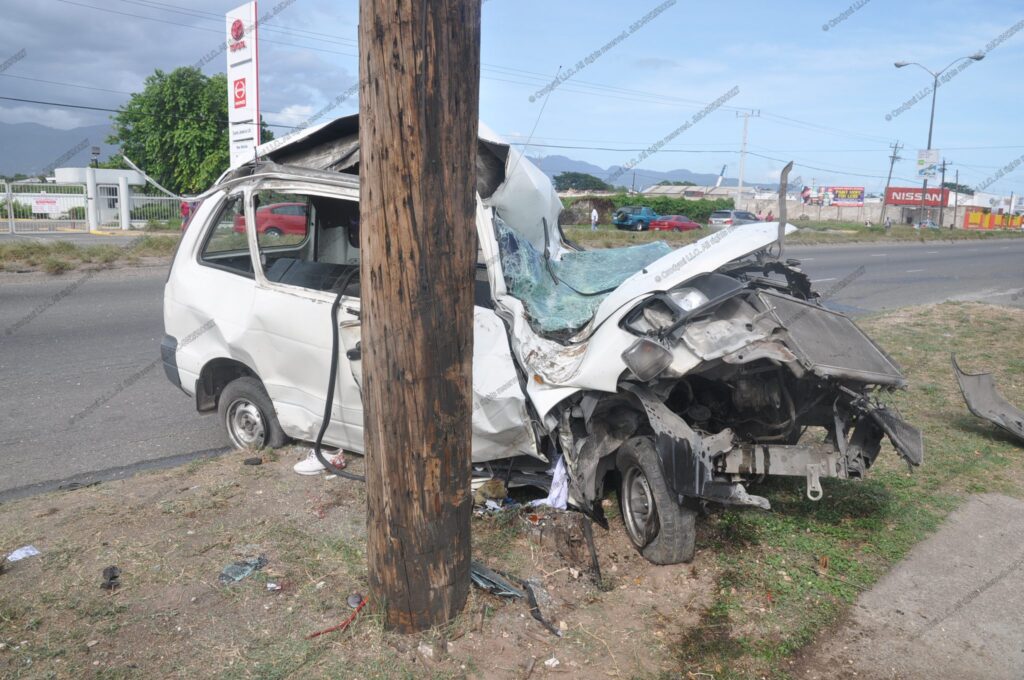
White van wrapped around a wooden utility pole after a severe frontal collision; windshield shattered and front end crushed.
Forensic Crash Evidence

Dashcam vs EDR: Why Black Box Data Matters

A dash camera can show what happened around the vehicle, while an Event Data Recorder can reveal what the vehicle itself was doing in the critical seconds surrounding a crash. Examining both evidence sources can provide a more complete picture of how a collision developed.
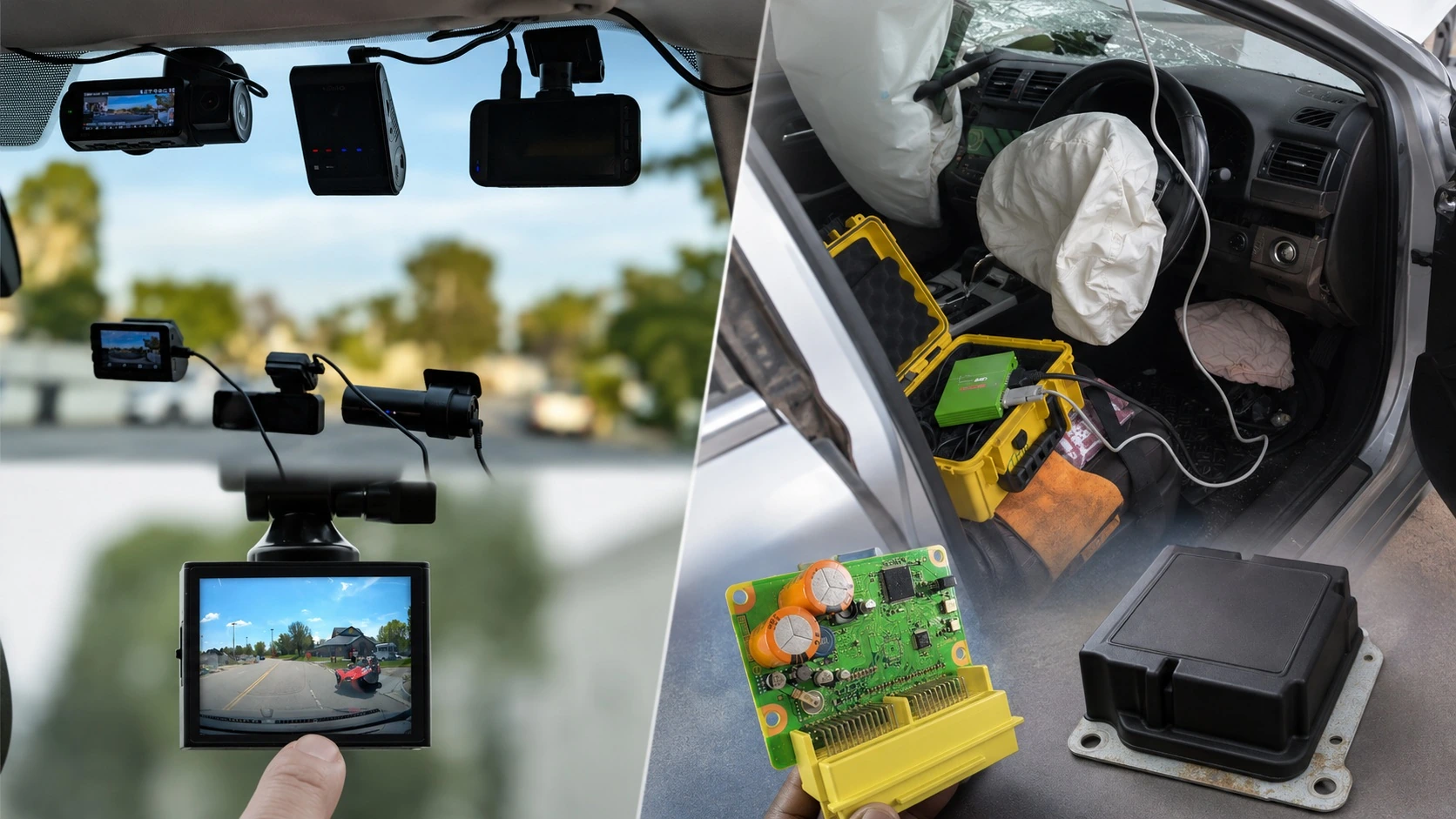
Dashcam versus Event Data Recorder EDR black box evidence used in forensic crash reconstruction

Two Different Evidence Sources. One More Complete Crash Picture.

Dashcam footage provides visual context surrounding a collision, while EDR or black-box data can document electronic information about vehicle operation and the crash event. Each source has different strengths, limitations, and forensic value.

Dashcam

Visual Evidence

  • Captures roadway, traffic, hazards and vehicle movement.
  • Can provide an immediate visual record of a collision.
  • Video can assist with timing, movement and visibility analysis.
  • Cameras may be knocked out of position during a crash or severe maneuver.
  • A dashcam may lose electrical power during impact.
  • Footage may be obstructed by debris, airbags or windshield damage.
  • Many systems primarily record forward-facing footage and may miss side or rear impacts.
  • Memory cards may become corrupted, lost, removed or damaged.
EDR / Black Box

Vehicle-System Data

  • May record vehicle speed during the seconds preceding a crash.
  • May document braking and accelerator or throttle input.
  • May record seat-belt, airbag and restraint-system information.
  • May provide longitudinal and lateral crash-related information.
  • Crash severity information may include Delta-V and related parameters.
  • Data is generally stored within protected vehicle electronic modules.
  • Retrieval may require specialized hardware, software and technical expertise.
  • EDR evidence can be compared with video, physical evidence and vehicle damage during reconstruction.
Vehicle Speed
Brake Status
Throttle Input
Crash Video
Airbag Deployment
Delta-V
Vehicle Movement
Crash Reconstruction

Get started

Start the process today — no upfront payment required. We’ll provide the service now, and you can settle the payment later.

📊 Dashcam vs. EDR: What Really Tells the Story of a Crash?

A dashcam can show what happened around the vehicle. An Event Data Recorder (EDR) may reveal what the vehicle itself was doing in the critical seconds surrounding the crash.

🎥 Dashcam Footage Provides Important Visual Evidence

  • Shows traffic movement, roadway conditions, lane position, and surrounding vehicles
  • May capture traffic signals, signs, pedestrians, cyclists, and potential hazards
  • Can document the sequence of events immediately before impact
  • May provide useful audio, GPS, timestamp, or speed information, depending on the camera
  • Can be analyzed using known distances and timing to help evaluate vehicle movement and speed

But a dashcam has limitations. Camera angle, lens distortion, obstructions, power loss, missing frames, or a limited field of view can prevent the video from showing the entire crash sequence.

📊 What an Event Data Recorder (EDR) Can Add

Depending on the vehicle, model year, recorded event, and manufacturer, an EDR may preserve technical data such as:

  • Vehicle speed during the seconds leading to the recorded event
  • GPS location, exact date, and time of the crash event that triggered airbag deployment, when recorded and available from the vehicle’s systems
  • Brake application and pedal input — service-brake status and, when recorded by the vehicle, the percentage of brake-pedal application and/or measured brake pressure
  • Accelerator or throttle input — accelerator-pedal position or throttle opening, including the percentage applied during the seconds leading up to the crash
  • Delta-V — the recorded change in velocity associated with the crash
  • Airbag deployment information
  • Driver seatbelt status and certain restraint information
  • Crash-event timing information
  • Additional vehicle parameters when supported by the specific vehicle and recording system

Not every vehicle records the same information, and not every collision produces a downloadable EDR event. That is why the vehicle's year, make, model, modules, and recorded event must be evaluated before determining what data may be available.

🎥 Dashcam = Visual Context     📊 EDR = Vehicle-System Data

The strongest crash investigation often does not rely on one source of evidence alone. A dashcam may show a vehicle entering an intersection, changing lanes, braking, or approaching another vehicle, while the EDR may provide technical information about the recording vehicle's speed, braking, accelerator input, restraints, or crash severity.

When the dashcam footage and EDR data are evaluated together — along with vehicle damage, roadway evidence, photographs, measurements, and other available electronic data — investigators can develop a much more complete time-based reconstruction of the collision.

🔍 Why Video Alone Can Sometimes Be Misleading

  • Wide-angle lenses can affect the apparent distance and closing speed between vehicles
  • A front-facing camera may not show a side or rear collision
  • The driver's hands, brake pedal, and accelerator are normally outside the camera's field of view
  • Video timestamps or GPS speed should be evaluated for accuracy and sampling rate
  • Impact forces may interrupt power, corrupt files, or change the camera's orientation

This does not make dashcam evidence unreliable. It means the footage should be interpreted within its technical limitations and compared with other available evidence.

🧩 The Real Value Comes From Combining the Evidence

Consider a crash where one driver says, "I was braking before impact," while another witness believes the vehicle never slowed down.

The dashcam may show the closing distance between the vehicles and the moment of impact. The EDR may provide recorded speed and brake-status information. Roadway measurements and vehicle damage may provide additional physical evidence.

Each source answers a different question. Together, they allow the investigator to test whether the available evidence supports or contradicts the accounts being given.

🛡️ Crodymi LLC: EDR, Video & Crash Evidence Analysis

  • Event Data Recorder (EDR) / vehicle black box data retrieval
  • Dashcam and camera-footage analysis
  • Vehicle data interpretation and preservation
  • Crash-scene and vehicle documentation
  • Accident reconstruction and technical analysis
  • Support for attorneys, insurers, investigators, businesses, and vehicle owners

Dashcam footage can show the scene. EDR data can reveal critical vehicle information.
The strongest analysis often comes from understanding how those pieces of evidence fit together.

Get started

Start the process today — no upfront payment required. We’ll provide the service now, and you can settle the payment later.

⚖️ Dashcam vs. EDR: Advantages, Limitations & Key Differences

Dashcam footage and Event Data Recorder (EDR) data are both valuable forms of electronic crash evidence, but they serve very different purposes. A dashcam primarily records what can be seen around the vehicle, while an EDR records technical information about how the vehicle and its safety systems were operating.

🎥 Dashcam Evidence

Dashcams provide visual evidence of the roadway, traffic, vehicles, pedestrians, signals, hazards and events surrounding a collision.

✓ Advantages of Dashcam Evidence

  • Usually quick to retrieve. Footage may simply be copied from an SD card, internal storage, mobile application or cloud account.
  • Does not normally require expensive crash-data retrieval equipment. Basic preservation can often be performed using ordinary computer equipment, although forensic analysis may require specialized software.
  • Shows the surrounding environment. Video may capture traffic lights, road signs, other vehicles, pedestrians, weather conditions, lane positions and roadway hazards.
  • Can provide a longer timeline. A dashcam may record minutes before and after a collision rather than only the brief crash-event window typically associated with EDR data.
  • May include GPS, date, time and speed information. Availability and accuracy depend on the particular camera and its settings.
  • Can document other vehicles. Unlike an EDR, which primarily describes the vehicle containing it, a camera may show the movements of several vehicles involved in the crash.
  • Easy for attorneys, insurers and jurors to understand. Video provides an immediate visual representation of the event.

✕ Limitations of Dashcam Evidence

  • The camera or memory card can be removed, lost or stolen. Many dashcams are mounted openly inside the passenger compartment.
  • Memory cards can fail or become corrupted. A severe impact or sudden loss of electrical power may also interfere with the final video file being saved correctly.
  • Loop recording can overwrite important evidence. If footage is not preserved promptly, newer recordings may replace the crash video.
  • Digital files can be copied, converted or edited. For important litigation, investigators should preserve the original files, metadata and storage media and document the chain of custody.
  • Limited field of view. A front-facing camera may completely miss a side impact, rear impact or events occurring outside the camera's viewing angle.
  • Perspective can be misleading. Wide-angle lenses, camera position and distortion can affect the apparent distance, speed and movement of objects.
  • Usually cannot directly show driver-control inputs. The video ordinarily cannot tell an investigator precisely how far the accelerator was depressed or whether a brake switch was activated.

📊 Event Data Recorder (EDR) / Vehicle Black Box

An EDR is typically a factory-integrated vehicle function that records technical vehicle and safety-system information associated with certain crash or near-crash events.

✓ Advantages of EDR Data

  • Factory-integrated evidence. Unlike many aftermarket dashcams, EDR functionality is incorporated into vehicle systems by the vehicle manufacturer.
  • Records technical vehicle information. Depending on the vehicle and event, available data may include vehicle speed, brake status, accelerator input, delta-V, restraint information and airbag deployment.
  • Often physically better protected than removable camera media. EDR information is commonly stored within a vehicle safety or control module rather than on an exposed removable memory card.
  • Data may remain recoverable after a severe collision. Even when vehicle wiring or the normal diagnostic connection is damaged, supported modules can sometimes be removed or accessed directly using specialized crash-data retrieval equipment.
  • More resistant to casual alteration. EDR information is normally retrieved directly from the vehicle module using specialized hardware and software rather than edited like an ordinary video file.
  • Can provide objective numerical measurements. Recorded values can be compared with vehicle damage, roadway evidence, video footage and reconstruction calculations.
  • May remain stored after the crash. Depending on the manufacturer and event type, crash information may remain within the module long after dashcam loop-recording footage would have been overwritten.
  • EDR data has specific federal privacy protection in the United States. Under the Driver Privacy Act of 2015, EDR data generally belongs to the vehicle owner or lessee and access is restricted except under specified circumstances.

✕ Limitations of EDR Data

  • Specialized equipment may be required. EDR retrieval may require manufacturer-specific or third-party hardware, licensed software, cables and supported interfaces.
  • Professional interpretation is often necessary. A crash-data report should be interpreted with its vehicle-specific limitations, event thresholds, sign conventions, data accuracy and other physical evidence.
  • Retrieval can be more expensive than copying dashcam footage. Severely damaged vehicles may require direct-to-module access, disassembly, auxiliary power or module removal.
  • Not every vehicle records the same information. EDR capabilities vary by manufacturer, model, model year, module and crash event.
  • Not every collision produces an EDR record. The crash must generally satisfy the particular system's event-recording criteria.
  • The recorded time window is relatively short. EDRs are designed to capture crash-related information over seconds rather than continuously recording a journey.
  • An EDR normally does not show the surrounding scene. It cannot ordinarily tell you what color the traffic signal was, where another vehicle was located or what a pedestrian was doing.
  • EDRs are not indestructible. Severe fire, water intrusion, electrical damage or physical destruction of the module can make retrieval difficult or impossible.

🔍 Side-by-Side Comparison

Feature 🎥 Dashcam 📊 EDR / Black Box
Retrieval Speed Often fast — SD card, app or storage device May require specialized equipment and access procedures
Retrieval Cost Usually relatively inexpensive Generally more expensive and technically specialized
Visual Evidence ✓ Excellent ✕ Conventional EDR does not record video
Vehicle Speed May require GPS data or forensic video analysis Often directly recorded on supported events
Brake / Accelerator Data Usually not directly available May be directly recorded
Other Vehicles / Traffic Signals ✓ May be clearly visible ✕ Not normally recorded
Storage Media Often removable SD card or internal camera memory Integrated vehicle control/safety module
Risk of Loss / Overwrite Higher — loop recording, lost card, theft or corruption Event-dependent; data may remain stored but can sometimes be overwritten
Crash Durability Camera/card can be displaced, damaged or lose power Often better protected inside the vehicle, but not indestructible
Ease of Editing Ordinary video files can be copied or modified Casual alteration is considerably more difficult
Factory Installed Often aftermarket, although factory camera systems also exist Typically integrated by the vehicle manufacturer
Privacy / Access Protection Depends on device, jurisdiction and circumstances Specific U.S. federal EDR ownership/access protections apply
Best For Seeing the crash environment and sequence Measuring technical vehicle and crash-event behavior
⚠️ Important distinction: A conventional Event Data Recorder does not store video or audio. However, some modern vehicles contain separate factory-installed camera, ADAS, infotainment, telematics or driver-assistance systems that may preserve additional electronic information. These systems should be evaluated separately from the EDR when investigating a crash.

🧩 Neither Technology Tells the Entire Story Alone

The dashcam may show what was happening around the vehicle, while the EDR may reveal what the vehicle itself was doing. When those sources are synchronized with vehicle damage, roadway evidence, photographs, measurements and other electronic data, they can provide a substantially stronger foundation for professional crash reconstruction and forensic analysis.

📚 Frequently Asked Questions

Answers to common questions about Event Data Recorders (EDRs) and Dashboard Cameras.

1. What is an Event Data Recorder (EDR)?
An EDR is a factory-installed electronic device that records vehicle time in seconds, speed, brakes, ABS and traction control activities, steering inputs, throttle, airbag deployment, and more during a crash. It provides secure, objective evidence used for crash reconstructions and in court.
2. What is a Dashboard Camera (Dash Cam)?
A dash cam is a video recorder mounted on the windshield or dash. It captures visual footage used for insurance, disputes, and personal protection.
3. How are EDRs and Dash Cams different?
EDRs capture technical data automatically and securely; dash cams provide video but can be lost or tampered with. EDRs are for accuracy; dash cams add context.
4. Where are these devices typically located?
EDRs are inside the airbag control module under the dash or seat. This device is bolted to the metallic frame of a vehicle in a secure location. Dash cams mount on windshields (front/rear), bumpers, or in the cabin.
5. Who can install or access these devices?
EDR access requires a trained investigator. Dash cams can be installed or accessed by vehicle owners or mechanics.
6. How accurate is speed or delta-V data from each device?
EDRs are calibrated and highly accurate; dash cams may estimate speed using GPS or video, but accuracy depends on installation and calibration.
7. What’s the price to have each installed and analyzed?
EDR: $0 to install (factory) — $350–$850+ for retrieval/report.
Dash Cam: $80–$500 to install; $0–$100 to analyze footage.
8. What are commonly used terms you should know?
EDR, CDR, Direct-to-Module Download (D2M), Diagnostic Port Download, data link connector (DLC), OBD-II port ,Table-top Download, HDMI cable,USB/SD Cards/Wi-Fi/Bluetooth transfers.
9. Can dash-cam footage be stolen or lost in a crash?
Yes. Dash cams are exposed and may be damaged, edited or stolen. EDRs are built-in and survive most crashes, fires, and water. EDR data cannot be changed or altered.
10. Is one better than the other for court or insurance use?
EDR data is preferred for technical accuracy and security; dash cams are valuable for visuals and context.
11. What camera types are common in modern vehicles?
Front/rear dash cams, blind-spot (side) cameras, 360° cameras, bumper cams, cabin cams, driver-monitoring cams.
12. Why is EDR data important after a crash?
EDR data can clarify the full crash sequence, vehicle actions, and mechanical responses for legal, insurance, and safety investigations. In addition to recording objective crash metrics, modern Event Data Recorders (EDRs) provide a comments section that allows certified crash investigators to document key observations—such as tire size and type, condition of seat belts and suspension, airbag deployment, damage locations, tread depth, and other vital information. These expert notations ensure that the raw data is accompanied by professional context and any critical findings observed during the download or imaging process.

Get started

Start the process today — no upfront payment required. We’ll provide the service now, and you can settle the payment later.